Thursday, September 5, 2013

Blog #1; The Difference Between Engaging, Enhancing and Extending Learning Through Technology


The Difference Between Engaging, Enhancing and Extending
Learning Through Technology; 
and how it can be used in physical education


The video above discusses the benefits of technology in 21st century education. The speaker, Jessie Woolley- Wilson, is a an eLearning advocate. Wilson is also President of Leapfrog School House and also President of Dream Box learning, an "intelligent Adaptive Learning platform that teaches students at any level of understanding how to become better junior mathematicians"(TedxTalks, 2012). During her TED talks she explains Blended Learning and the importance of technology. She defines Blended Learning as, “Learning that combines traditional face-to-face classroom … with innovative learning technologies that have the power in my mind to democratize learning” (Jessie Woolley- Wilson cited in TedxTalks, 2012). This concept is extremely innovative, made so every child can receive a great education regardless of where they live. The computer software uses intelligent adapter technology to collect data about the student; how they solve the problem, time it takes them, where they moved their mouse etc. This data is then used to help the student on to the next level that is appropriate for them, not just because they may have gotten the answer correct. This type of technology is the exact reason why exposing every child is vital. The pace and direction in which technology will be implemented in the classroom is growing rapidly. Students need to stay current and comfortable so they can receive the best possible education out there in the future.


With technology on the rise, school systems are being asked to integrate technology into the standard classroom. An article on EdTech Education Network states, “technology makes a difference in improving test scores and helping students reach performance goals. Technology also engages students in learning; improves attendance, decreases dropout rates, increases graduation rates and facilitates parent involvement” (Ed Tech Action Network). Although technology has all sorts of benefits the problem lies in properly integrating the technology so it engages, enhances, and extends the learning from traditional teaching strategies.


What does engaging, enhancing, and extending mean to you? Well, to be quite honest your own interpretation and understand of these terms may not be entirely correct. The article “ Engage, Enhance, and Find out what these terms really mean when you integrate technology” by Liz Keren-Kolb will be sure to give you insight and understanding.

In the article, Liz Keren- Kolb, touches on the positive aspects of integrating technology but also expands on the definitions of how technology must engage, enhance and extend learning in order to reach its full potential as a teaching tool. The definitions are as follows:


Engagement: The teacher is trying to find a way to motivate or interest disengaged students

  •  allows students to focus on assignments
  • motivates students
  •  passive to active learners

In order to engage students with disabilities schools are beginning to incorporate the use of  video sports games in the physical education classroom. This allows kids with disabilities to participate in physical activity that they would normally be left out of. They are able to engage in physical education by using the video game because it is less competitive, uses less complex motor skills and less social skills than team sports (Mckeon, 2012).


Enhancement: This is using technology to develop understanding of learning goals that could not have been accomplished without those tools.
  •  more sophisticated understanding of content
  • easier to understand concepts and ideas
  • demonstrate their understanding with non traditional tools

A featured article on Education World explained that by using technology, “PE teachers are able to collect valid, reliable data and monitor student fitness progress on a daily and yearly basis. Teachers also can use the data to provide students and their parents with charts and graphs, illustrating their effort -- and their improvements -- in PE class. Additionally, the data collected helps teachers meet school and state PE requirements. (Delisio, 2010)” Technology also allows students and teachers to do the following;
  •     keeping track of their improvements and allowing them to reach goals they have set for themselves
  •     collecting data on website; can check in whenever and set new goals to reach
(Delisio, 2010)


Extension: The technology brings learning outside the classroom walls and into student's everyday lives, where they can continue to grow after they leave school.
  •  learn outside of their typical school day
  •  bridges school and home learning
  • continue to use tools throughout life
Physical Educator, Mr. Bridge, integrated twitter into his class. His aim was to  use twitter as a "platform to highlight student success, accomplishments, and to share healthy living tips in real-time"(Bridge, 2013). After exploring the benefits of twitter he realized, "not only is twitter tremendous for sharing program highlights, there is an entire community of Phys. Ed. and health educators sharing teaching success and failures, collaborating on projects/unit planning, and taking part in professional dialogue" (Bridge, 2013). He learned that twitter was able to keep the teacher, students and parents connected. By introducing students to technology in the classroom the students are more likely to then use this tools on their own. It bridges school and home life. Another example of extending technology would be Google apps. When apps are downloaded onto iPads during class, kids are more likely to then use the apps on their own outside of school. If the students continue to use the tools they are introduced to while in school they are more likely to use this tools for the rest of their lives.

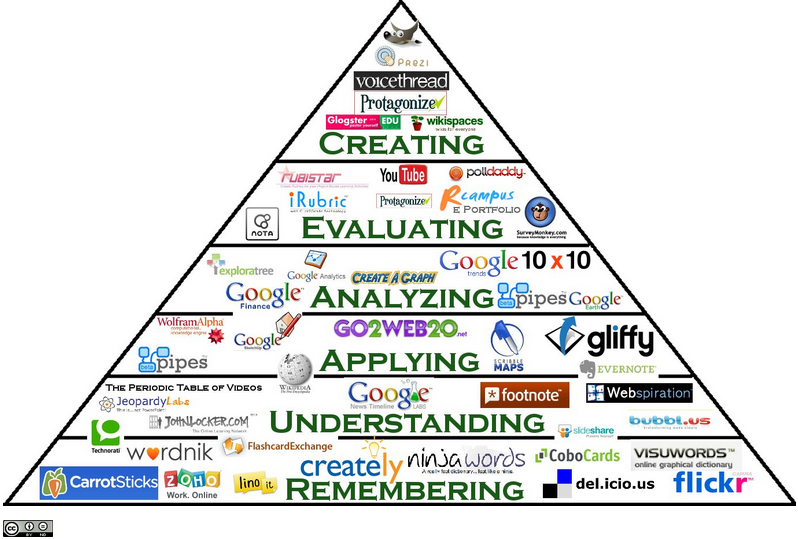
Technology is also a great way to connect students globally, expose them to new technology they may not ordinarily have access to, and to motivate them to explore! More examples can be seen in the Digital Bloom's Taxonomy below. Technology should be integrated into every classroom, including health and physical education!


References
Delisio, E. (n.d.). Retrieved from http://www.educationworld.com/a_issues/chat/chat258.shtml

Digital Bloom's Taxonomy. Retrieved on August 28th, 2013, from http://classroom-aid.com/technology-resources/.

Keren- Kolb, L. (2013, May). Engage, Enhance, and find out what these terms really mean when you integrate technology. Retrieved on August 28, 2013.

Mckeon, B. (2012, July 10). Retrieved from http://www.huffingtonpost.com/barbara-mckeon/physical-education-and-technology_b_1662957.html

(n.d.). Retrieved from http://www.edtechactionnetwork.org/why-technology-in-schools

TedxTalks. (2012, December 17). Blending Technology and CLassroom Learning: Jessie Woolley- Wilson. Retrieved on August 28, 2013, from http://www.youtube.com/watch?v=o0TbaHimigw


Tuesday, September 3, 2013

Blog #1- The Difference Between Engaging, Enhancing and Extending Learning Through Technology


The Difference Between Engaging, Enhancing and Extending Learning Through Technology
and how it can be used in physical education


The Video above discusses the benefits of technology in 21st century education. The speaker, Jessie Woolley- Wilson, is a an eLearning advocate. Wilson is also President of Leapfrog School House and also President of Dream Box learning, an "intelligent Adaptive Learning platform that teaches students at any level of understanding how to become better junior mathematicians"(TedxTalks, 2012). During her TED talks she explains Blended Learning and the importance of technology. She defines Blended Learning as, “Learning that combines traditional face-to-face classroom … with innovative learning technologies that have the power in my mind to democratize learning” (Jessie Woolley- Wilson cited in TedxTalks, 2012). This concept is extremely innovative, made so every child can receive a great education regardless of where they live. The computer software uses intelligent adapter technology to collect data about the student; how they solve the problem, time it takes them, where they moved their mouse etc. This data is then used to help the student on to the next level that is appropriate for them, not just because they may have gotten the answer correct. This type of technology is the exact reason why exposing every child is vital. The pace and direction in which technology will be implemented in the classroom is growing rapidly. Students need to stay current and comfortable so they can receive the best possible education out there in the future.


With technology on the rise, school systems are being asked to integrate technology into the standard classroom. An article on EdTech Education Network states, “technology makes a difference in improving test scores and helping students reach performance goals. Technology also engages students in learning; improves attendance, decreases dropout rates, increases graduation rates and facilitates parent involvement” (Ed Tech Action Network). Although technology has all sorts of benefits the problem lies in properly integrating the technology so it engages, enhances, and extends the learning from traditional teaching strategies.

What does engaging, enhancing, and extending mean to you? Well, to be quite honest your own interpretation and understand of these terms may not be entirely correct. The article “ Engage, Enhance, and Find out what these terms really mean when you integrate technology” by Liz Keren-Kolb will be sure to give you insight and understanding.

In the article, Liz Keren- Kolb, touches on the positive aspects of integrating technology but also expands on the definitions of how technology must engage, enhance and extend learning in order to reach its full potential as a teaching tool. The definitions are as follows:

Engagement: The teacher is trying to find a way to motivate or interest disengaged students
  •  allows students to focus on assignments
  • motivates students
  •  passive to active learners
In order to engage students with disabilities schools are beginning to incorporate the use of  video sports games in the physical education classroom. This allows kids with disabilities to participate in physical activity that they would normally be left out of. They are able to engage in physical education by using the video game because it is less competitive, uses less complex motor skills and less social skills than team sports (Mckeon, 2012).

Enhancement: This is using technology to develop understanding of learning goals that could not have been accomplished without those tools.
  •  more sophisticated understanding of content
  • easier to understand concepts and ideas
  • demonstrate their understanding with non traditional tools


A featured article on Education World explained that by using technology, “PE teachers are able to collect valid, reliable data and monitor student fitness progress on a daily and yearly basis. Teachers also can use the data to provide students and their parents with charts and graphs, illustrating their effort -- and their improvements -- in PE class. Additionally, the data collected helps teachers meet school and state PE requirements. (Delisio, 2010)” Technology also allows students and teachers to do the following;
  •     keeping track of their improvements and allowing them to reach goals they have set for themselves
  •     collecting data on website; can check in whenever and set new goals to reach
(Delisio, 2010)


Extension: The technology brings learning outside the classroom walls and into student's everyday lives, where they can continue to grow after they leave school.
  •  learn outside of their typical school day
  •  bridges school and home learning
  • continue to use tools throughout life

Physical Educator, Mr. Bridge, integrated twitter into his class. His aim was to  use twitter as a "platform to highlight student success, accomplishments, and to share healthy living tips in real-time"(Bridge, 2013). After exploring the benefits of twitter he realized, "not only is twitter tremendous for sharing program highlights, there is an entire community of Phys. Ed. and health educators sharing teaching success and failures, collaborating on projects/unit planning, and taking part in professional dialogue" (Bridge, 2013). He learned that twitter was able to keep the teacher, students and parents connected. By introducing students to technology in the classroom the students are more likely to then use this tools on their own. It bridges school and home life. Another example of extending technology would be Google apps. When apps are downloaded onto iPads during class, kids are more likely to then use the apps on their own outside of school. If the students continue to use the tools they are introduced to while in school they are more likely to use this tools for the rest of their lives.
Technology is also a great way to connect students globally, expose them to new technology they may not ordinarily have access to, and to motivate them to explore! More examples can be seen in the Digital Bloom's Taxonomy below. Technology should be integrated into every classroom, including health and physical education!


References
Delisio, E. (n.d.). Retrieved from http://www.educationworld.com/a_issues/chat/chat258.shtml

Digital Bloom's Taxonomy. Retrieved on August 28th, 2013, from http://classroom-aid.com/technology-resources/.

Keren- Kolb, L. (2013, May). Engage, Enhance, and find out what these terms really mean when you integrate technology. Retrieved on August 28, 2013.

Mckeon, B. (2012, July 10). Retrieved from http://www.huffingtonpost.com/barbara-mckeon/physical-education-and-technology_b_1662957.html

(n.d.). Retrieved from http://www.edtechactionnetwork.org/why-technology-in-schools

TedxTalks. (2012, December 17). Blending Technology and CLassroom Learning: Jessie Woolley- Wilson. Retrieved on August 28, 2013, from http://www.youtube.com/watch?v=o0TbaHimigw


Wednesday, April 10, 2013

Evernote: Useful Teacher Productivity App


 Useful Teacher Productivity App


Throughout the semester I found the Evernote app to be extremely helpful. Evernote allows me to stay organized while writing notes, making lists, and creating lessons. One of my favorite features is that the notes are easy to search and organized into folders.  It also allows for text recognition, making them easy to find not only documents but photos as well. This particular feature would be ideal for SMARTBoards. With Evernote you can sync all of your documents, just like the popular app DropBox.  Tagging is also an important feature in organizing your documents. Tagging a document allows you to use key words in order to pull up the particular note you're searching for. The picture below shows the different folders that can be made using Evernote. 


In addition to the great writing aspects of this app there are also many other features. For instance, this app allows you to record important audio and personal thoughts immediately. You can then attach it to a lesson plan or document you are working on. Do you have a great example of the project you are presenting to your class? Take a picture of it and attach it right into the lesson plan.  There is also a picture feature that allows you to take pictures of textbooks and attach it to lesson plans. Worksheets that need to be part of a lesson can easily be attached in this manor. This allows you to format the photo correctly so it can be easily viewed. The app also has built-in audio capture support and integrates with tools like the LiveScribe digital pen.

The video below shows the basics of Evernote through a screencast, making it easier to follow along. It explains in an easy to follow tutorial about how the software works and the basics of Evernote. The short, Two minute video, gives you the perfect glimpse or the wonderful and time saving features Evernote has to offer!


Evernote can be accessed from just about anywhere. I may not always have my iPad so being able to access Evernote from my mobile phone and personal computer is extremely important to me. I can then update my documents from just about anywhere! This straight forward note taking app keep you completely synced at all time. There are three main versions of Evernote; Evernote for iPad, Evernote Web app, and Evernote for Windows.


Evernote also has great support when it comes to their blog and podcasts sections.  The free version of Evernote is all you need to stay organized from a avid users perspective.  The benefit to the paid version is that it allows you to share notes with clients and partners. In an article, Melanie Pinola states, “Evernote is a cross-platform app that serves many purposes; for example, it can be your digital file cabinet, note-taking tool, daily journal, task or project management system, and recipe-keeper”. To read more reviews about this 5.5 star app click here!

This app can be extremely useful as a teacher productivity app! Evernote is even marketed towards teachers claiming that, "Evernote is a great tool for teachers to capture notes, organize lesson plans, collaborate on projects, snap photos of whiteboards, and more. Everything you add to your account is automatically synced and made available on all the computers, phones and tablets you use, at home or at school". I dare you to try this app and see if it can make your life even just a little easier! 


Wednesday, January 30, 2013

iPads in the Classroom

Year after year technology in the classroom is becoming more advanced. Teachers are expected to keep up with the most innovative technology. Recently the iPad has been introduced into the 21st century classroom. Teachers are regularly using the iPad to assist in various subjects and allow for a more hands-on environment.  Teachers are using apps, iTunes U, iBook, as well as the camera and video for interactive learning in the classroom. As seen in the image below there are many benefits to using the iPad regularly in education. 


In certain subjects the iPad is a key learning tool in developing skills needed for future learning. For instance, math apps like Math Evolve allow for a more engaging learning style than flash cards and times tables. Rather than memorizing and reviewing information time and time again, an app has been developed to help kids learn math in a more interesting way. Teachers are able to encourage kids to learn key concepts like multiplication and division using the iPad. As seen in the video below, kids are thrilled to use these helpful educational games. 


In addition to Math Evolve, check out the 10 best apps for education!


The benefits of the iPad are endless. The goal for iPads is not to just introduce current technology and bring a more interactive classroom environment The main goal for using iPads is to benefit students, and potentially raising their scores. For example, in Maine "administrators are using the iPad in controlled areas to prove its efficacy in raising literacy rates and teaching mathematical skills. This case study is part of a bigger program dubbed the Advantage 2014 initiative, which aims to raise literacy and numeracy skills from 63 percent and 60 percent, respectively (as measured in spring 2011), to 90 percent in the 2014–2015 school year" (Ion).


Although there seem to be great success with implementing the use of iPads in the classroom there is one main concern. Are the iPads costing school systems too much? This is a large topic of controversy for many school systems. iPads cost approximately $500 a piece, causing schools to be hesitant. The price can seem steep but compared to textbooks they are actually saving school money in the long run. The NBC San Diego news station recently did a story concerning the cost efficiency of iPads in the area. It is stated that, "seventh graders carry anywhere from $300 to $500 worth of books with them each year" according to Lillian Leopold, a spokeswoman for the district" (Steussey). Although textbooks are reused, often times new additions come out causing the school to purchase new books. By using iPads rather than re-buying textbooks should save the district about $3 million.


Overall, iPads are worth the investment. The benefits outweigh the costs. Kids are able to develop vital skills and learn to use the most current technology. The iPad can be used in all subjects by simply downloading games, books, and other learning tools like a calculator or dictionary. Overall, the iPad can help change the face of education by allowing kids to explore and learn in the true technological world we live in, in turn transforming what we know as the 21st century classroom.


Resources

Apple in Education. http://www.apple.com/education/ipad/

Florence Ion ( 2012 May 18). iPads in the Classroom are Changing the Face of Education. http://www.maclife.com/article/features/ipads_classroom_are_changing_face_education

InterActionEducation (2012 March 27).
http://www.interactioneducation.com/ipadsineducation.html

Lauren Steussy (2012 February 23). Are iPads in the Classroom Worth It? http://www.nbcsandiego.com/news/local/Are-iPads-in-the-Classroom-Worth-It-Sweetwater-140227653.html#ixzz2JUPboHLb

Meris Stansbury ( 2012 April 21). New: 10 of the best Apple apps for education in 2012. http://www.eschoolnews.com/2012/04/21/new-10-shiny-apple-apps-for-education/

Monday, April 16, 2012


Technology in the Classroom
Twitter, Jing, Edmodo, Wordle

Technology is constantly changing. With these changes comes improvements in our schools systems. Teachers are able to connect better with one another, their students, and make life in the classroom more interesting. Using Twitter, Jing, Edmodo and Wordle along with many technolgogies has helped integrate technology into the lives of educators and into the classroom setting.


Twitter
As a teacher one must be careful not to use social networking sites in the wrong way, twitter and Facebook are often a big no no for many teachers, however, if used correctly they become a great tool for education. For instance, if a teacher has assigned a project the students in the class will be able to follow the teachers professional twitter in order to keep up with assignments, view tutorials, ask questions, and learn to use social networking in the proper way. They will be held responsible for what they write but also be rewarded for answering other students questions, seeking help and making sure to have the assignment on time. Twitter will also allow your students to get access to their assignments from multiple devices, it is paperless, and will learn how to network. It allows not only the teacher to track their participation but also gives a chance for the student to. Twitter is a great resource teachers should begin to utilize more often. It allows for a more interesting way to engage learners than lecturing.Twitter keeps students on track by allowing them to constantly check deadlines for assignments.

Misconceptions of Twitter
  • Only for celebrity gossip, sports, blogging and personal thought
  • Information on Twitter is not relevant to learning
  • Any Twitter feed is useful because it contains information
Benefits of Twitter
  • Gives students an alternative way to participate
  • Keeps thoughts focused
  • Immediate communication
  • Increased personal communication skills
  • collaboration with others
  • Provides an outlet to ask questions
  • Resource to connect with professionals

Jing
Due to the increase in technology in the classroom, Jing is a wonderful tool to know how to use! It not only makes life easier when copying images but can also copy videos as well. If a picture is unable to be copied and pasted into the needed location you can simply Jing it! Jing is a free sophware that can be easily installed on ones desk top and quickly accessed when needed. It allows one to essentially “share screens” with the other person viewing your blog, lesson plan, or directions. In a classroom setting Jing could be used in multiple ways, especially when attempting to show step by step directions on a computer. At the beginning of the semester we worked alongside a tutorial, learning how to use this great and useful software. I later used Jing on multiple occasions, especially with slide shows for other classes. Jing works as a great visual aide! Here is a tutorial on how to Jing an image or video!


Edmodo
From the very start of the semester we have been using Edmodo in order to assign upcoming blogs, share blogs and assignments, receive grades and notifications and see each others work when possible. Edmodo has allowed for collaboration between not only the teacher but the class. It has allowed for a safe technologically advanced classroom community. The thing that I have enjoyed most about Edmodo is the calender. The calender is a great way to be able to plan out what is due, when it is due, and how much time I should allot for a particular assignment. Having assignments laid out in a calender form has always helped me plan effectively and efficiently. Turning in Assignments and receiving grades was a breeze. To turn in an assignment you simply send the link to the teacher on the due date. The teacher can then easily reply back that it has come through correctly. Not long after you'll receive a notification saying that it has been graded. Overall, Edmodo is a great tool to use as a student and as a teacher. It has been implemented into my classroom nicely and should be used in High Schools all over the country. I believe this would be a great source to use for an English class where things are often done on the computer. It keeps things paperless (so nothing is lost in the shuffle) and allows for students to keep track of their progress.


Wordle
Wordle was the very first assignment that was given in my Education Tech class. Wordle is an image made by words that express a certain idea or thing that is made into a “word cloud”. It was a great way for us to introduce ourselves to the class while getting acclimated with using the schools computers and Edmodo (where we posted our creations). Wordle was an interesting way to say ones interests, hobbies, background and random facts about oneself.

Uses for Wordle
  • spelling lists
  • names/ interests
  • general display purposes
  • reflections
  • poetry