The Difference Between Engaging, Enhancing and Extending
Learning Through Technology;
and how it can be used in physical education
and how it can be used in physical education
The video above discusses the benefits of technology in 21st century education. The speaker, Jessie Woolley- Wilson, is a an eLearning advocate. Wilson is also President of Leapfrog School House and also President of Dream Box learning, an "intelligent Adaptive Learning platform that teaches students at any level of understanding how to become better junior mathematicians"(TedxTalks, 2012). During her TED talks she explains Blended Learning and the importance of technology. She defines Blended Learning as, “Learning that combines traditional face-to-face classroom … with innovative learning technologies that have the power in my mind to democratize learning” (Jessie Woolley- Wilson cited in TedxTalks, 2012). This concept is extremely innovative, made so every child can receive a great education regardless of where they live. The computer software uses intelligent adapter technology to collect data about the student; how they solve the problem, time it takes them, where they moved their mouse etc. This data is then used to help the student on to the next level that is appropriate for them, not just because they may have gotten the answer correct. This type of technology is the exact reason why exposing every child is vital. The pace and direction in which technology will be implemented in the classroom is growing rapidly. Students need to stay current and comfortable so they can receive the best possible education out there in the future.
With technology on the rise, school systems are being asked to integrate technology into the standard classroom. An article on EdTech Education Network states, “technology makes a difference in improving test scores and helping students reach performance goals. Technology also engages students in learning; improves attendance, decreases dropout rates, increases graduation rates and facilitates parent involvement” (Ed Tech Action Network). Although technology has all sorts of benefits the problem lies in properly integrating the technology so it engages, enhances, and extends the learning from traditional teaching strategies.
What does engaging, enhancing, and extending mean to you? Well, to be quite honest your own interpretation and understand of these terms may not be entirely correct. The article “ Engage, Enhance, and Find out what these terms really mean when you integrate technology” by Liz Keren-Kolb will be sure to give you insight and understanding.
In the article, Liz Keren- Kolb, touches on the positive aspects of integrating technology but also expands on the definitions of how technology must engage, enhance and extend learning in order to reach its full potential as a teaching tool. The definitions are as follows:
In order to engage students with disabilities schools are beginning to incorporate the use of video sports games in the physical education classroom. This allows kids with disabilities to participate in physical activity that they would normally be left out of. They are able to engage in physical education by using the video game because it is less competitive, uses less complex motor skills and less social skills than team sports (Mckeon, 2012).
Engagement: The teacher is trying to find a way to motivate or interest disengaged students
- allows students to focus on assignments
- motivates students
- passive to active learners
In order to engage students with disabilities schools are beginning to incorporate the use of video sports games in the physical education classroom. This allows kids with disabilities to participate in physical activity that they would normally be left out of. They are able to engage in physical education by using the video game because it is less competitive, uses less complex motor skills and less social skills than team sports (Mckeon, 2012).
Enhancement: This is using technology to develop understanding of learning goals that could not have been accomplished without those tools.
- more sophisticated understanding of content
- easier to understand concepts and ideas
- demonstrate their understanding with non traditional tools
A featured article on Education World explained that by using technology, “PE teachers are able to collect valid, reliable data and monitor student fitness progress on a daily and yearly basis. Teachers also can use the data to provide students and their parents with charts and graphs, illustrating their effort -- and their improvements -- in PE class. Additionally, the data collected helps teachers meet school and state PE requirements. (Delisio, 2010)” Technology also allows students and teachers to do the following;
- keeping track of their improvements and allowing them to reach goals they have set for themselves
- collecting data on website; can check in whenever and set new goals to reach
(Delisio, 2010)
Extension: The technology brings learning outside the classroom walls and into student's everyday lives, where they can continue to grow after they leave school.
- learn outside of their typical school day
- bridges school and home learning
- continue to use tools throughout life
Physical Educator, Mr. Bridge, integrated twitter into his class. His aim was to use twitter as a "platform to highlight student success, accomplishments, and to share healthy living tips in real-time"(Bridge, 2013). After exploring the benefits of twitter he realized, "not only is twitter tremendous for sharing program highlights, there is an entire community of Phys. Ed. and health educators sharing teaching success and failures, collaborating on projects/unit planning, and taking part in professional dialogue" (Bridge, 2013). He learned that twitter was able to keep the teacher, students and parents connected. By introducing students to technology in the classroom the students are more likely to then use this tools on their own. It bridges school and home life. Another example of extending technology would be Google apps. When apps are downloaded onto iPads during class, kids are more likely to then use the apps on their own outside of school. If the students continue to use the tools they are introduced to while in school they are more likely to use this tools for the rest of their lives.
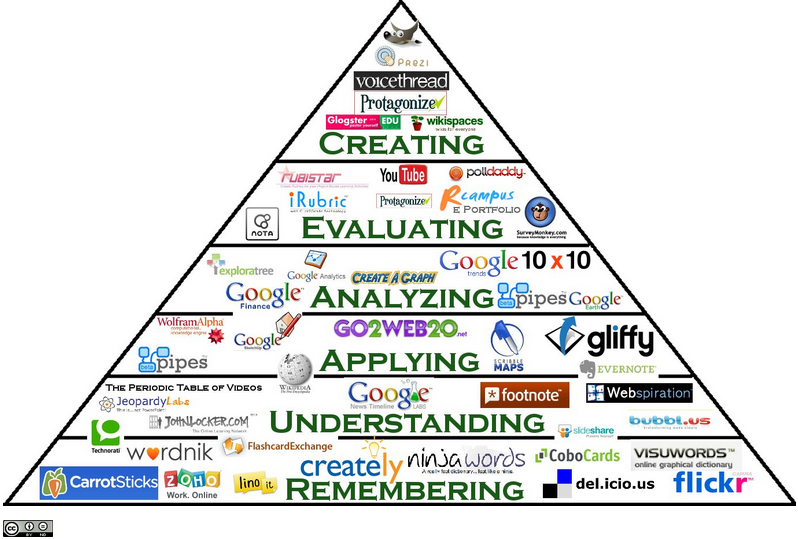
Technology is also a great way to connect students globally, expose them to new technology they may not ordinarily have access to, and to motivate them to explore! More examples can be seen in the Digital Bloom's Taxonomy below. Technology should be integrated into every classroom, including health and physical education!

Keren- Kolb, L. (2013, May). Engage, Enhance, and find out what these terms really mean when you integrate technology. Retrieved on August 28, 2013.
Mckeon, B. (2012, July 10). Retrieved from http://www.huffingtonpost.com/barbara-mckeon/physical-education-and-technology_b_1662957.html
(n.d.). Retrieved from http://www.edtechactionnetwork.org/why-technology-in-schools
TedxTalks. (2012, December 17). Blending Technology and CLassroom Learning: Jessie Woolley- Wilson. Retrieved on August 28, 2013, from http://www.youtube.com/watch?v=o0TbaHimigw
Technology is also a great way to connect students globally, expose them to new technology they may not ordinarily have access to, and to motivate them to explore! More examples can be seen in the Digital Bloom's Taxonomy below. Technology should be integrated into every classroom, including health and physical education!
References
Delisio, E. (n.d.). Retrieved from http://www.educationworld.com/a_issues/chat/chat258.shtml
Digital Bloom's Taxonomy. Retrieved on August 28th, 2013, from http://classroom-aid.com/technology-resources/.Keren- Kolb, L. (2013, May). Engage, Enhance, and find out what these terms really mean when you integrate technology. Retrieved on August 28, 2013.
Mckeon, B. (2012, July 10). Retrieved from http://www.huffingtonpost.com/barbara-mckeon/physical-education-and-technology_b_1662957.html
(n.d.). Retrieved from http://www.edtechactionnetwork.org/why-technology-in-schools
TedxTalks. (2012, December 17). Blending Technology and CLassroom Learning: Jessie Woolley- Wilson. Retrieved on August 28, 2013, from http://www.youtube.com/watch?v=o0TbaHimigw